Ableton Live 12’s scale awareness only reacts to selected clips, which creates a problem in Arrangement View where no clip selection occurs during playback. The Advanced Scale Awareness pack solves this limitation by letting you automate scale in Ableton Arrangement with breakpoint automation, enabling automatic scale and root note changes as your transport plays through different song sections. Learn more about the pack right here.
The Scale Awareness Limitation in Arrangement View
In Session View, scale awareness works intuitively. When you select different clips, Ableton Live automatically adopts each clip’s scale awareness setting as the master scale awareness setting. Your Push controller updates its key layout accordingly, and everything follows the selected clip’s scale.
However, in Arrangement View, the transport plays continuously without selecting clips. Consequently, scale awareness remains static throughout playback—even if you’ve set different scales for different sections of your arrangement. This limitation prevents your Push from automatically adapting to key changes as your song progresses.

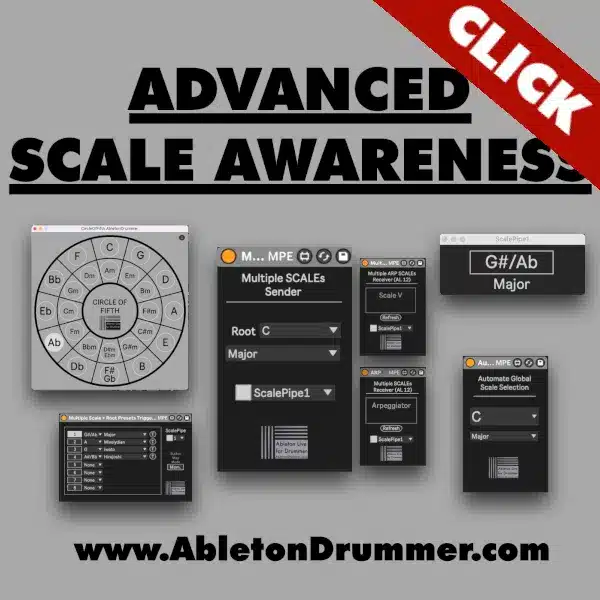
The Automate Scale Awareness device from the Advanced Scale Awareness pack eliminates this restriction, letting you automate scale in Ableton Arrangement precisely where you need key changes.
How to Automate Scale in Ableton Arrangement
The Automate Scale Awareness device is a Max for Live MIDI device that sits on any MIDI track in your arrangement. Once loaded, you can automate scale in Ableton Arrangement by drawing breakpoint automation for both root notes and scale types.
Setup workflow:
First, load the Automate Scale Awareness device onto a MIDI track. Next, enable Automation View in Ableton Live by pressing “A” or clicking the automation toggle. Select the device from the automation lane dropdown to reveal its automatable parameters.

The device provides two key parameters: Root Note and Scale Type. Create automation breakpoints by clicking on the automation line where you want scale changes to occur. For example, set your starting point to A Minor, then add a breakpoint at bar 16 to switch to E Major Pentatonic.
Change the Key Layout on Push in Arrangement View
When you automate scale in Ableton Arrangement using this device, your Push controller automatically updates its key layout as the transport passes each breakpoint as the main Scale Awareness will be changed. This functionality proves essential for live performance and composition workflows where different song sections require different scales.
For instance, start your verse in A Dorian, then automate a transition to D Major at the chorus. When playback reaches that breakpoint, both the global scale awareness setting and your Push’s key layout update automatically—no manual switching required.
Moreover, you can combine root note and scale type changes at the same breakpoint for complete key modulation. Set a breakpoint that simultaneously changes from A Major to D Minor Pentatonic, creating smooth transitions between drastically different harmonic contexts.
Set Up Scale Changes in Multiple Sections
To automate scale in Ableton Arrangement across multiple song sections, create breakpoints at each transition point in your timeline. Click the automation line at the beginning of each section and set the appropriate root note and scale type.

The device supports all scale types available in Ableton’s scale awareness system: major, minor, dorian, phrygian, lydian, mixolydian, aeolian, locrian, major pentatonic, minor pentatonic, blues, and more. Consequently, you can create complex harmonic progressions that move through various modal and tonal centers throughout your arrangement.
Use the Monitor Scale Awareness popup window (included in the Advanced Scale Awareness pack) to monitor current scale settings visually. This popup displays the active root note and scale type in large, readable text, making it easy to verify your automation during playback.
Practical Applications for Scale Automation
The ability to automate scale in Ableton Arrangement opens several creative and performance workflows:
Composition with Key Changes: Program key modulations into your arrangement, letting you compose freely within each section’s scale without manual switching between keys.
Push Performance: Perform arrangements on Push with automatic scale layout updates, ensuring you always play in-key notes regardless of which section is playing.
Modal Progression: Create arrangements that move through multiple modes (dorian to lydian to mixolydian) with automatic transitions at precisely defined moments.
Live Set Automation: Prepare arrangements for live performance where the Push controller must adapt to different keys throughout the set without manual intervention.
Why You Need the Advanced Scale Awareness Pack
Ableton’s native scale awareness works perfectly in Session View but falls short in Arrangement View. The Automate Scale Awareness device bridges this gap, providing the same dynamic scale following behavior in arrangements that Session View offers with clip selection.
This “semi-global” scale awareness approach means your scale settings update automatically during arrangement playback while maintaining compatibility with Ableton’s scale awareness system. Your Push controller, scale-aware MIDI effects, and any other devices following scale awareness all respond to these automated changes.
The Advanced Scale Awareness pack includes multiple devices for comprehensive scale control across different workflow scenarios. Moreover, the pack supports advanced techniques for global scale awareness implementation beyond the standard Ableton approach.
Requirements and Compatibility
To automate scale in Ableton Arrangement, you need:
- Ableton Live 12 (scale awareness is available since Ableton Live 12)
- Max for Live (included in Live Suite or available as an add-on for Live Standard)
- The Advanced Scale Awareness pack from AbletonDrummer.com
The Automate Scale Awareness device works as a MIDI device on any MIDI track. It doesn’t process audio or MIDI notes—it simply controls Ableton’s global scale awareness setting via automation, making it lightweight and CPU-efficient. Don’t miss the two video tutorials to dive deeper into the matter.